
CONTROLLER
WHAT THE CONTROLLER IS DOING AND LOOKING FOR:
- When the Thermostat is turned “ON” it connects the 2 blue wires (we say “Call for Heat”), the 1st thing the controller does is look at the Sail Switch.
- Is the sail switch “closed”? If so, error light flashes, the fan never comes on. If the switch is in a condition where it is closed when the fan is on – then the controller knows there is already a problem and safely handles it by doing NOTHING.
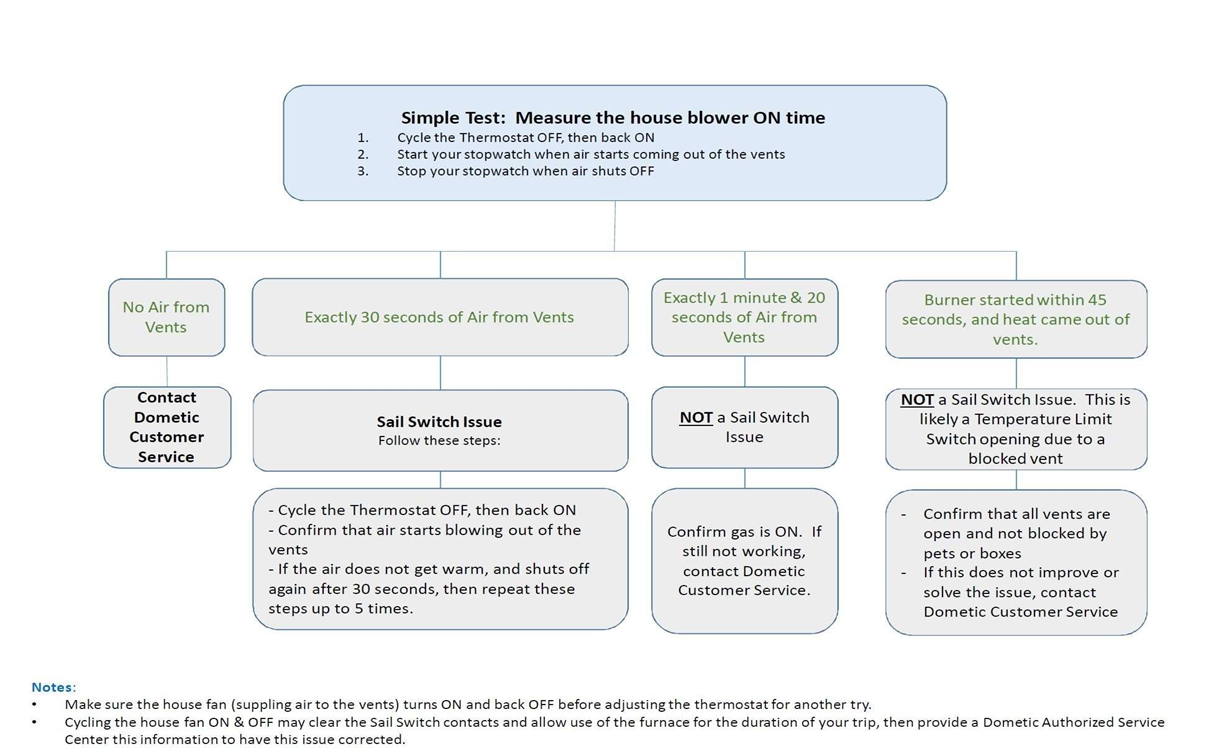
- Is the sail switch “open”? If so, it turns on the Fan, and looks for the switch to “close”. If it closes, then the furnace purges any gas from the heat exchanger with air and starts the trial for ignition. If it remains “open”, then the blower only runs about 30 seconds and shuts off. It never opens the gas valve or sparks – because it senses that the switch is bad, and shuts down safely.
*Just knowing what the controller is looking for helps tremendously and the next slide will solve most problems.
BEST METHOD TO TROUBLESHOOT A SAIL SWITCH
Remove the 2 wires from the sail switch. If the switch is bad, this will at least show as “open” and turn the blower on. Turn the furnace ON.
- If the blower does not come on, and blinks 1 time again, it is most likely a short somewhere in the wire harness of the furnace. You have eliminated the sail switch as an issue.
- If the blower does come on, but 30 seconds later turns off by itself and you get the 1 flash code, then the sail switch needs to be replaced.
To confirm this:
- Leave the switch disconnected
- Turn on the Furnace
- 1 to 4 seconds after the blower comes on, connect the 2 sail switch wires with a jumper (paper clip, etc). Wait another 15 seconds to see if the furnace ignites. If it does, replace the sail switch
Note: You cannot jumper the sail switch and expect it to function normally. The controller will see the jumper and will not turn on the blower.